CDS MOC Service (astroquery.mocserver)
Getting started
This module provides a python interface for querying the CDS MOCServer.
What’s a MOC?
MOC means Multi-Order Coverage. It’s an IVOA standard that allows to describe Space-Time coverages of arbitrary sky regions, with or without an associated time of observation.
The space component maps the sky with the HEALPix sky tessellation to represent regions on the sky by hierarchically grouped HEALPix cells. It other words, a Spatial MOC is a set of HEALPix cells at different orders.
The idea is the same for Time MOCs. The time axis is split into time cells.
For those wanting to know more about MOCs, please refer to the MOC 2.0 specification document.
MOCPy is a Python library allowing to manipulate these Space-Time Coverage objects. You’re welcome to have a look at MOCPy’s documentation.
What’s the MOC Server?
The MOC Server is a service of astronomical resources organized by spatial and/or
temporal coverages following the Space and Time MOC specification.
In the MOC Server, there a few tens of thousands of astronomical collections.
They each have an identifier ID and a set of properties that describe their content.
This is a practical way of finding datasets with criteria on time and/or space.
The meta data properties are freely assigned by each publisher. You can get the current
list of properties with their frequency of usage and examples example with
astroquery.mocserver.MOCServerClass.list_fields.
This method also accepts a string to limit the number of responses. Let’s try with MOC:
>>> from astroquery.mocserver import MOCServer
>>> MOCServer.list_fields("MOC")
<Table length=7>
   field_name    occurrence                                example
     str27         int64                                    str70
---------------- ---------- ----------------------------------------------------------------------
        moc_type      34226                                                                   smoc
  moc_access_url      33084 https://alasky.unistra.fr/footprints/tables/vizier/J_AJ_165_248_tab...
moc_sky_fraction      30175                                                               4.271E-6
       moc_order      30161                                                                     11
  moc_time_range       5319                                                                   5491
  moc_time_order       5319                                                                     35
moc_release_date          4                                                      2015-02-25T11:51Z
Here, we learn that there are very few MOC-related field names. The most frequent is
moc_type that will tell if the MOC is a spatial moc (smoc), a temporal moc
(tmoc)…
Querying with a region
The MOCServer is optimized to return the datasets having at least one source lying in a
specific sky region (or time interval).
The regions can be provided either as astropy-regions from the
regions python library,
or as an accepted MOC type (mocpy.TimeMOC, mocpy.MOC, STMOC).
The frequency MOCs are not yet available.
Performing a query on a cone region
Let’s get the datasets for which all the data is comprised in a cone (this is
what the enclosed option means for intersect). We also restrict our search to
datasets describing the sky (with coordinate_system=sky).
>>> from astropy import coordinates
>>> from regions import CircleSkyRegion
>>> from astroquery.mocserver import MOCServer
>>> center = coordinates.SkyCoord(10.8, 32.2, unit='deg')
>>> radius = coordinates.Angle(0.5, unit='deg')
>>> cone = CircleSkyRegion(center, radius)
>>> MOCServer.query_region(region=cone, intersect="enclosed", coordinate_system="sky")
<Table length=450>
              ID               ...
            str49              ...
------------------------------ ...
          CDS/C/GALFAHI/Narrow ...
      CDS/C/GALFAHI/Narrow/DR2 ...
        CDS/C/GALFAHI/Wide/DR2 ...
                CDS/C/HI4PI/HI ...
                 CDS/I/220/out ...
                 CDS/I/243/out ...
                 CDS/I/252/out ...
                 CDS/I/254/out ...
                 CDS/I/255/out ...
                           ... ...
                 ov-gso/P/WHAM ...
   simg.de/P/NSNS/DR0_1/halpha ...
  simg.de/P/NSNS/DR0_1/halpha8 ...
     simg.de/P/NSNS/DR0_1/hbr8 ...
simg.de/P/NSNS/DR0_1/sn-halpha ...
    simg.de/P/NSNS/DR0_1/sn-vc ...
      simg.de/P/NSNS/DR0_1/tc8 ...
       simg.de/P/NSNS/DR0_1/vc ...
     wfau.roe.ac.uk/P/UHSDR1/J ...
       wfau.roe.ac.uk/UHSDR1/J ...
You can also use this method with regions.PolygonSkyRegion, mocpy.MOC, mocpy.TimeMOC,
and mocpy.STMOC. Not providing the region parameter means that the search is done on
the whole sky (or the whole planet, if we chose a different coordinate_system).
Querying by meta-data
Retrieving datasets based on their meta-data values
The criteria parameter of query_region()
allows to write an expression on the dataset’s metadata to filter the output.
Let’s add a criteria to get only images from the previous query:
>>> from astropy import coordinates
>>> from regions import CircleSkyRegion
>>> from astroquery.mocserver import MOCServer
>>> center = coordinates.SkyCoord(10.8, 32.2, unit='deg')
>>> radius = coordinates.Angle(0.5, unit='deg')
>>> cone = CircleSkyRegion(center, radius)
>>> MOCServer.query_region(region=cone, intersect="enclosed",
...                 fields=['ID', 'dataproduct_type', 'moc_sky_fraction'],
...                 criteria="dataproduct_type=image")
<Table length=336>
              ID               dataproduct_type moc_sky_fraction
            str49                    str5           float64
------------------------------ ---------------- ----------------
                 CDS/P/2MASS/H            image              1.0
                 CDS/P/2MASS/J            image              1.0
                 CDS/P/2MASS/K            image              1.0
             CDS/P/2MASS/color            image              1.0
         CDS/P/AKARI/FIS/Color            image              1.0
          CDS/P/AKARI/FIS/N160            image              1.0
           CDS/P/AKARI/FIS/N60            image              1.0
         CDS/P/AKARI/FIS/WideL            image              1.0
         CDS/P/AKARI/FIS/WideS            image              1.0
                           ...              ...              ...
        ov-gso/P/RASS/SoftBand            image              1.0
                 ov-gso/P/WHAM            image              1.0
   simg.de/P/NSNS/DR0_1/halpha            image           0.6464
  simg.de/P/NSNS/DR0_1/halpha8            image           0.6464
     simg.de/P/NSNS/DR0_1/hbr8            image            0.651
simg.de/P/NSNS/DR0_1/sn-halpha            image           0.6466
    simg.de/P/NSNS/DR0_1/sn-vc            image           0.6466
      simg.de/P/NSNS/DR0_1/tc8            image            0.651
       simg.de/P/NSNS/DR0_1/vc            image           0.6464
     wfau.roe.ac.uk/P/UHSDR1/J            image           0.3083
Looking at the dataproduct_type column, all the datasets are indeed images. There
are a few less results than when we did not apply this additional criteria.
Other examples for filtering expressions can be found on the help page of the MOC Server web interface.
Let’s do a search on the whole sky by omitting the region parameter.
The next example retrieves all the moc_access_url of datasets having HST in
their identifier. These correspond to the Hubble surveys:
>>> MOCServer.query_region(criteria="ID=*HST*",
...                        fields=['ID', 'moc_access_url'],
...                        casesensitive=False)
<Table length=45>
            ID                                moc_access_url
          str26                                   str51
-------------------------- ---------------------------------------------------
CDS/P/HST-programs/3D-DASH                                                  --
               CDS/P/HST/B                                                  --
              CDS/P/HST/CO                                                  --
             CDS/P/HST/EPO                                                  --
         CDS/P/HST/GOODS/b      http://alasky.unistra.fr/GOODS/GOODSb/Moc.fits
     CDS/P/HST/GOODS/color http://alasky.unistra.fr/GOODS/GOODS-color/Moc.fits
         CDS/P/HST/GOODS/i      http://alasky.unistra.fr/GOODS/GOODSi/Moc.fits
         CDS/P/HST/GOODS/v      http://alasky.unistra.fr/GOODS/GOODSv/Moc.fits
         CDS/P/HST/GOODS/z      http://alasky.unistra.fr/GOODS/GOODSz/Moc.fits
                       ...                                                 ...
               CDS/P/HST/Y                                                  --
           CDS/P/HST/other                                                  --
          CDS/P/HST/wideUV                                                  --
           CDS/P/HST/wideV                                                  --
      ESAVO/P/HST/ACS-blue                                                  --
           ESAVO/P/HST/FOC                                                  --
        ESAVO/P/HST/NICMOS                                                  --
          ESAVO/P/HST/WFC3                                                  --
          ESAVO/P/HST/WFPC                                                  --
         ESAVO/P/HST/WFPC2                                                  --
Query for Hierarchical Progressive Surveys (HiPS)
The MOCServer contains an extensive list of HiPS,
for images and catalogs. These progressive surveys can be displayed in applications
such as ipyaladin. The
astroquery.mocserver.MOCServerClass.query_hips method allows to find these HiPS.
It accepts the same parameters (region and criteria for example) as the other
methods. The only difference is that the output will only contain HiPS data.
>>> from astroquery.mocserver import MOCServer
>>> MOCServer.query_hips(coordinate_system="mars")
<Table length=25>
                 ID                 ...
               str35                ...
----------------------------------- ...
           CDS/P/Mars/Express286545 ...
            CDS/P/Mars/MGS-MOLA-DEM ...
            CDS/P/Mars/MGS-TES-Dust ...
              CDS/P/Mars/MOLA-color ...
                 CDS/P/Mars/MRO-CTX ...
              CDS/P/Mars/TES-Albedo ...
     CDS/P/Mars/TES-Thermal-Inertia ...
     CDS/P/Mars/THEMIS-Day-100m-v12 ...
CDS/P/Mars/THEMIS-IR-Night-100m-v14 ...
                                ... ...
    idoc/P/omega/emissivite_5-03mic ...
    idoc/P/omega/emissivite_5-05mic ...
    idoc/P/omega/emissivite_5-07mic ...
    idoc/P/omega/emissivite_5-09mic ...
          idoc/P/omega/ferric_bd530 ...
          idoc/P/omega/ferric_nnphs ...
          idoc/P/omega/olivine_osp1 ...
          idoc/P/omega/olivine_osp2 ...
          idoc/P/omega/olivine_osp3 ...
       idoc/P/omega/pyroxene_bd2000 ...                                                                                                                                                                                             doi:10.1029/2012JE004117 ...                         omega pyroxene_bd2000
Here, we see that there are currently 25 HiPS surveys for the planet Mars available in the MOCServer.
Personalization of the queries
Changing the default fields
By default, query_region() returns an
astropy.table.Table with information about the matching datasets. The default fields
are ID, obs_title, obs_description, nb_rows, obs_regime,
bib_reference, and dataproduct_type.
To change this default behavior, use the fields parameter.
Let’s say we would like only the ID, and the moc_sky_fraction for this query:
>>> from astropy import coordinates
>>> from regions import CircleSkyRegion
>>> from astroquery.mocserver import MOCServer
>>> center = coordinates.SkyCoord(10.8, 32.2, unit='deg')
>>> radius = coordinates.Angle(0.5, unit='deg')
>>> cone = CircleSkyRegion(center, radius)
>>> MOCServer.query_region(region=cone,
...                        intersect="enclosed",
...                        fields=['ID', 'moc_sky_fraction'])
<Table length=450>
               ID               moc_sky_fraction
             str49                  float64
                 CDS/I/220/out           0.9697
                 CDS/I/243/out              1.0
                 CDS/I/252/out           0.9993
                 CDS/I/254/out              1.0
                 CDS/I/255/out           0.9696
                           ...              ...
                 ov-gso/P/WHAM              1.0
   simg.de/P/NSNS/DR0_1/halpha           0.6464
  simg.de/P/NSNS/DR0_1/halpha8           0.6464
     simg.de/P/NSNS/DR0_1/hbr8            0.651
simg.de/P/NSNS/DR0_1/sn-halpha           0.6466
We now see in a single glance that the dataset CDS/I/220/out covers almost all the
sky!
Limiting the number of returned datasets
Another parameter called max_rec specifies an upper limit for the number of data-sets to be returned:
>>> from astroquery.mocserver import MOCServer
>>> from mocpy import MOC
>>> MOCServer.query_region(region=MOC.from_string("5/22-24"), max_rec=3)
<Table length=3>
           ID            ... dataproduct_type
         str24           ...       str7
------------------------ ... ----------------
 CDS/J/AJ/156/102/table9 ...          catalog
CDS/J/ApJS/257/54/table1 ...          catalog
     CDS/III/39A/catalog ...          catalog
This result has only 3 rows although we know that more datasets match the query. The result will come faster than requesting all results.
Returning a mocpy object as a result
If you want the union of all the MOCs of the datasets matching the query, you can
get the result as a mocpy.MOC, mocpy.TimeMOC, or mocpy.STMOC object instead of an
astropy.table.Table by setting the parameter return_moc to smoc, tmoc, or
stmoc. An additional parameter max_norder allows to set the resolution/precision
of the returned MOC.
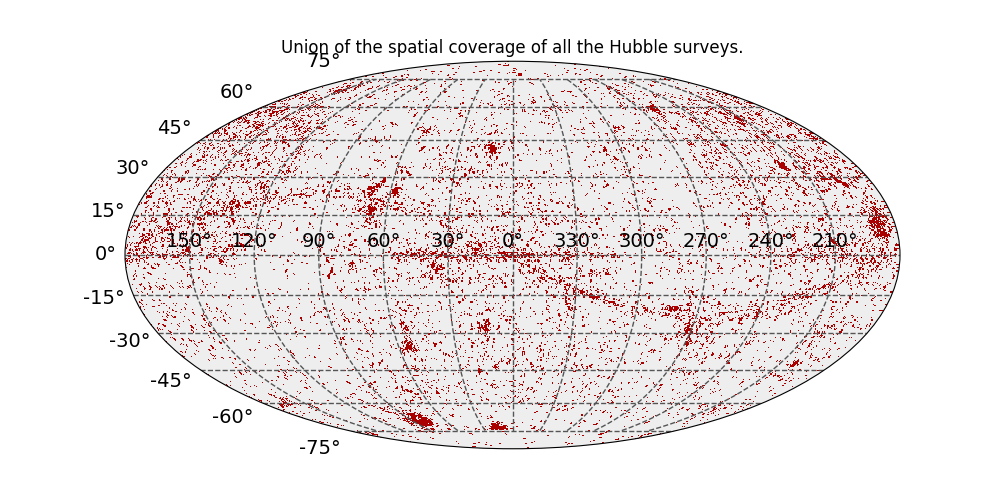
As an example, we would like to obtain the union of the space coverage of all the Hubble surveys:
>>> from mocpy import MOC
>>> import matplotlib.pyplot as plt
>>> from astroquery.mocserver import MOCServer
>>> moc = MOCServer.query_region(return_moc="smoc",
...                              max_norder=20,
...                              criteria="ID=*HST*")
The resulting MOC looks like:
Retrieve the STMOC of a specific dataset
To retrieve the MOC of a specific dataset, we can use
query_region.
This example will show you how to get the space-time MOC (i.e. a mocpy.STMOC
object) of the GALEXGR6/AIS/FUV survey.
>>> from mocpy import MOC
>>> from astroquery.mocserver import MOCServer
>>> moc_galex = MOCServer.query_region(criteria="ID=CDS/P/GALEXGR6/AIS/FUV",
...                                    return_moc="stmoc", max_norder="s7 t26")
>>> print(f"GALEX GR6 contains data taken from {moc_galex.min_time.iso} to"
...       f" {moc_galex.max_time.iso}.")
GALEX GR6 contains data taken from 2010-03-31 18:02:05.602 to 2010-06-01 18:57:24.787.
Note
Note that for Space-Time MOCs the max_norder parameter is not an integer but a
string that contains the information about both the spatial order and the time order.
Here, we requested a spatial order of 7 (roughly 27’) and a time order of 26 (roughly
9 hours).
Finding data on a specific solar system body
The default value for coordinate_system is None. It means that we’re looking for
data for the sky and all other possible frames. This parameter can take all the values
listed by astroquery.mocserver.MOCServerClass.list_coordinate_systems:
>>> from astroquery.mocserver import MOCServer
>>> MOCServer.list_coordinate_systems()
['ariel', 'callisto', 'ceres', 'charon', 'dione', 'earth', 'enceladus', 'equatorial', 'europa', 'galactic', 'ganymede', 'iapetus', 'io', 'jupiter', 'mars', 'mars-pia20284', 'mars-pia24422', 'mars-stimson', 'mercury', 'mimas', 'miranda', 'moon', 'moon-pan1', 'neptune', 'oberon', 'pluto', 'rhea', 'sky', 'sun', 'tethys', 'titan', 'titania', 'triton', 'umbriel', 'venus']
Where the special value sky means any celestial frame (mainly equatorial and
galactic).
The coordinate_system parameter can be used in any of the query methods like so:
>>> from astroquery.mocserver import MOCServer
>>> MOCServer.query_hips(coordinate_system="ariel")
<Table length=1>
         ID           obs_title   ... dataproduct_type
       str19            str13     ...       str5
------------------- ------------- ... ----------------
CDS/P/Ariel/Voyager Ariel Voyager ...            image
Reference/API
astroquery.mocserver Package
CDS MOCServer Query Tool.
- Author:
Matthieu Baumann (matthieu.baumann@astro.unistra.fr)
This package is for querying the CDS MOC service, primarily hosted at:
Note: If the access to MOCs with the MOCServer tool was helpful for your research, the following acknowledgment would be appreciated:
This research has made use of the MOCServer, a tool developed at CDS, Strasbourg,
France aiming at retrieving MOCs/meta-data from known data-sets. MOC is an IVOA
standard described in :
http://www.ivoa.net/documents/MOC/20140602/REC-MOC-1.0-20140602.pdf
Classes
|
Configuration parameters for |
Query the CDS MOCServer. |